

DVR in Car: A Driver's Guide to Dash Cam Systems

You're leaving the grocery store when another driver backs into your bumper, then insists you caused the damage. There's no helpful witness, the lot camera points in the wrong direction, and your memory of the few seconds before impact is already incomplete. A DVR in car, commonly called a dash cam, could have preserved the road, the impact, and what happened immediately afterward.
That's the reason to buy one. Not the impressive number printed on the box, but whether the system records dependable detail, keeps recording when the car is parked, and protects the relevant clip from being lost. The right setup depends on your vehicle, parking habits, and the kind of incident you need it to document.
Table of Contents
- What a DVR in Car Really Means for Everyday Drivers
- Dash Cam vs DVR and the Core Components Explained
- Key Features That Actually Matter in a Car DVR
- Power Options and Basic Installation Choices
- Real-World Use Cases From Security to Fleet
- Evidence Reliability and the Recording Gap Problem
- Choosing the Right Setup and Buying Checklist
- Practical Questions Drivers Ask Before Installing
What a DVR in Car Really Means for Everyday Drivers
An in-car DVR is a camera system that records video, and often audio, from inside or around your vehicle. Most units record continuously while you drive, saving files to a memory card and replacing older files when the card fills. With the right power connection, the system can also watch the vehicle while it's parked.
Think of it as an independent witness that doesn't get distracted, forget details, or change its story. A forward-facing camera can document a traffic collision, a sudden lane change, a hit-and-run, or an allegation that doesn't match what happened. A rear camera adds context when another vehicle strikes you from behind, while an interior camera can clarify events for rideshare or family use.
The everyday advantages go beyond disputes:
- Incident documentation: Footage can help show traffic lights, lane positions, road conditions, and vehicle movements.
- Parking protection: A parking-mode system may record an impact or suspicious activity near the car.
- Family oversight: Parents can review driving habits when a new driver borrows the vehicle.
- Route and trip records: Scenic drives, work routes, and unusual road events can be preserved for personal use.
The market has moved well beyond the niche-accessory stage. The global dashboard camera market was estimated at USD 4.03 billion in 2023 and is projected to reach USD 7.64 billion by 2030, with greater safety awareness, faster insurance claims, and concern over vehicle theft identified as expansion factors. Europe accounted for 33% of global revenue in 2023, according to Grand View Research's dashboard camera market analysis.
That growth also creates buyer confusion. Before choosing a model, decide how much of the vehicle you need to see, how much detail must survive compression, whether the camera should run while parked, and how you'll preserve footage after an incident.
Dash Cam vs DVR and the Core Components Explained
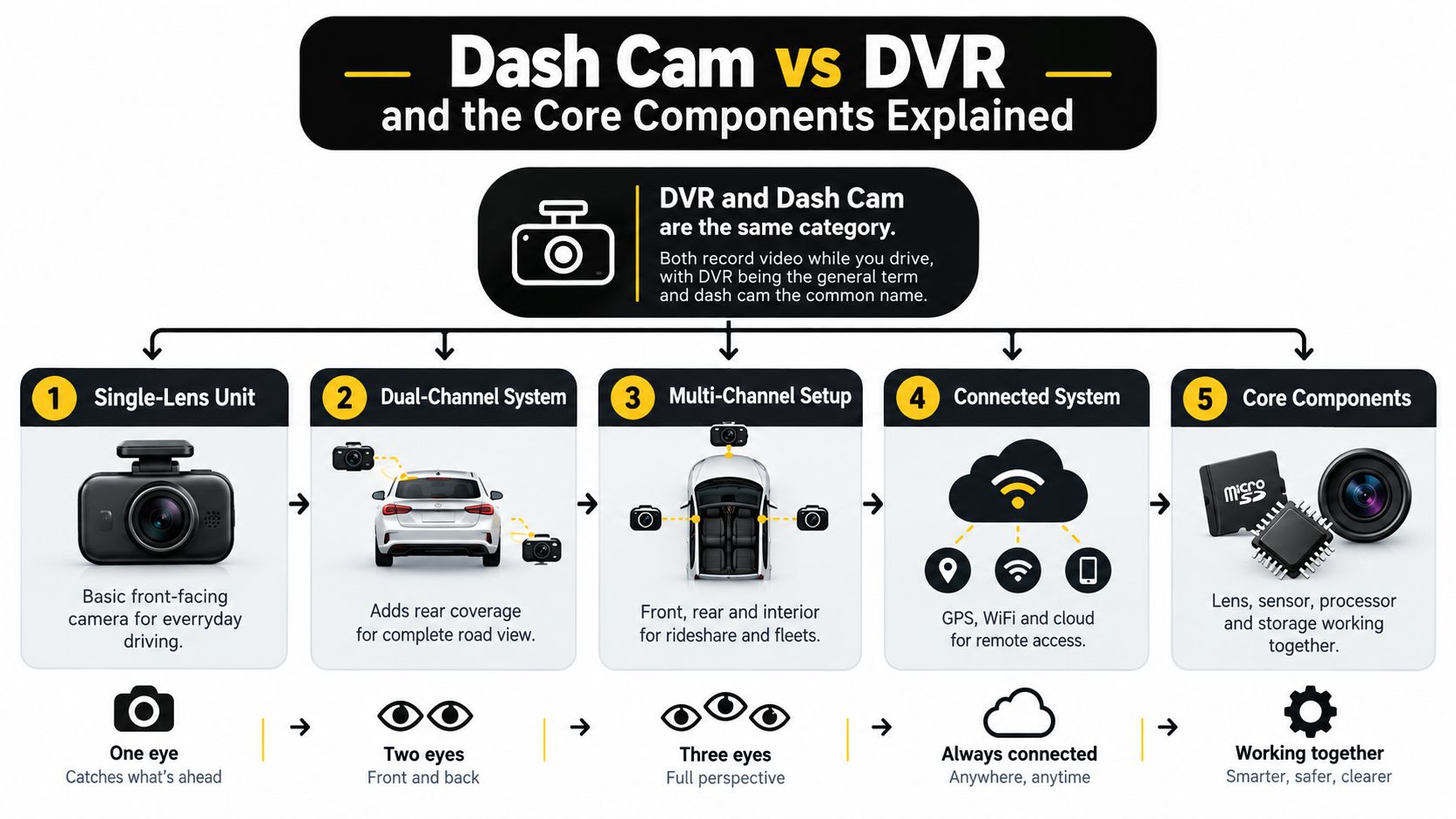
Dash cam and in-car DVR usually describe the same category. The difference is emphasis. Retailers often use “dash cam” for consumer products, while “DVR” may describe a broader vehicle recorder used in commercial, fleet, or multi-camera installations.
Start with the simplest system. A single-lens unit is a digital black box aimed through the windshield. It records the road ahead to a microSD card, divides the video into manageable files, and cycles through older files as storage fills. Like a tape deck that records over its oldest material, loop recording keeps the camera working without requiring you to delete files every day.
A dual-channel system adds a rear camera and a second video stream. A multi-channel setup can add an interior camera, side cameras, or cargo coverage. That extra view matters because the best camera configuration follows the event you need to document, not the feature list you find most attractive.
The parts that make the recorder work
- Lens and image sensor: The lens controls perspective and light gathering, while the sensor turns that light into an image.
- Processor: The processor compresses video, handles multiple cameras, and manages functions such as HDR or event detection.
- Storage: A microSD card is common in consumer systems. Commercial recorders may use larger solid-state storage.
- GPS receiver: GPS can attach position, route, date, and time information to files.
- Microphone: Audio can add context, but local recording and privacy rules matter.
- G-sensor: This detects sudden movement and may lock a file so loop recording doesn't overwrite it.
- Battery or supercapacitor: These provide short shutdown support. A supercapacitor is generally preferred for heat-tolerant vehicle use.
Parking mode turns the dash cam into something closer to a small security camera. Depending on the design, it may respond to impact, motion, or a timed recording schedule. Connected systems add Wi-Fi, LTE, cloud backup, live viewing, and app controls, changing the product from a standalone recorder into a vehicle-monitoring service.
Key Features That Actually Matter in a Car DVR
A high resolution label doesn't guarantee useful evidence. Resolution, bitrate, sensor performance, lens quality, and storage reliability work as a chain, and the weakest link can determine whether a license plate remains readable.
Bitrate deserves particular attention. Expert guidance places the approximate bitrate needed to avoid visible compression artifacts at 12 to 15 Mbps for 1080p, 25 to 30 Mbps for 1440p, and 50 to 60 Mbps for 4K. Some cameras advertise 4K while recording at only 20 to 30 Mbps, which can erase much of the detail advantage and reduce plate readability in motion, as explained in this dash cam resolution and bitrate guide.
A larger or better-performing sensor can help in low light, while HDR can preserve detail where headlights and dark road surfaces appear together. A wide field of view shows more of an intersection, but excessive width can stretch the edges and make distant objects look smaller.
| Feature | What It Actually Affects | Real-World Trade-Off |
|---|---|---|
| Resolution | Potential image detail | Higher resolution needs more storage and bitrate |
| Bitrate | Detail retained during compression | More data can improve clarity but fills storage faster |
| Sensor and HDR | Night and high-contrast performance | Better low-light handling can cost more |
| Field of view | How much of the scene appears | Wider coverage may increase edge distortion |
| Storage card | Recording continuity and file safety | A cheap card may fail under constant overwriting |
| GPS | Location, route, speed, and time context | Extra data doesn't replace clear video |
| G-sensor | Event locking after impacts | Incorrect sensitivity can miss or overprotect files |
| Parking mode | Monitoring while the car is unattended | It requires careful power planning |
Choose a high-endurance card designed for repeated write cycles, and verify that its speed rating matches the camera's requirements. Format it in the camera rather than relying only on a computer. A 4K unit starved by low bitrate or an unsuitable card can produce less useful evidence than a well-tuned 1080p system.
Practical rule: Judge sample footage at the speed and lighting you actually drive in, not from a still image captured from a product page.
Parking mode also comes in different forms. Motion-triggered recording can conserve power but may miss an event that begins outside the detection zone. Buffered parking mode can preserve the moments before an impact, while time-lapse recording offers broader surveillance with a different level of detail.
Power Options and Basic Installation Choices
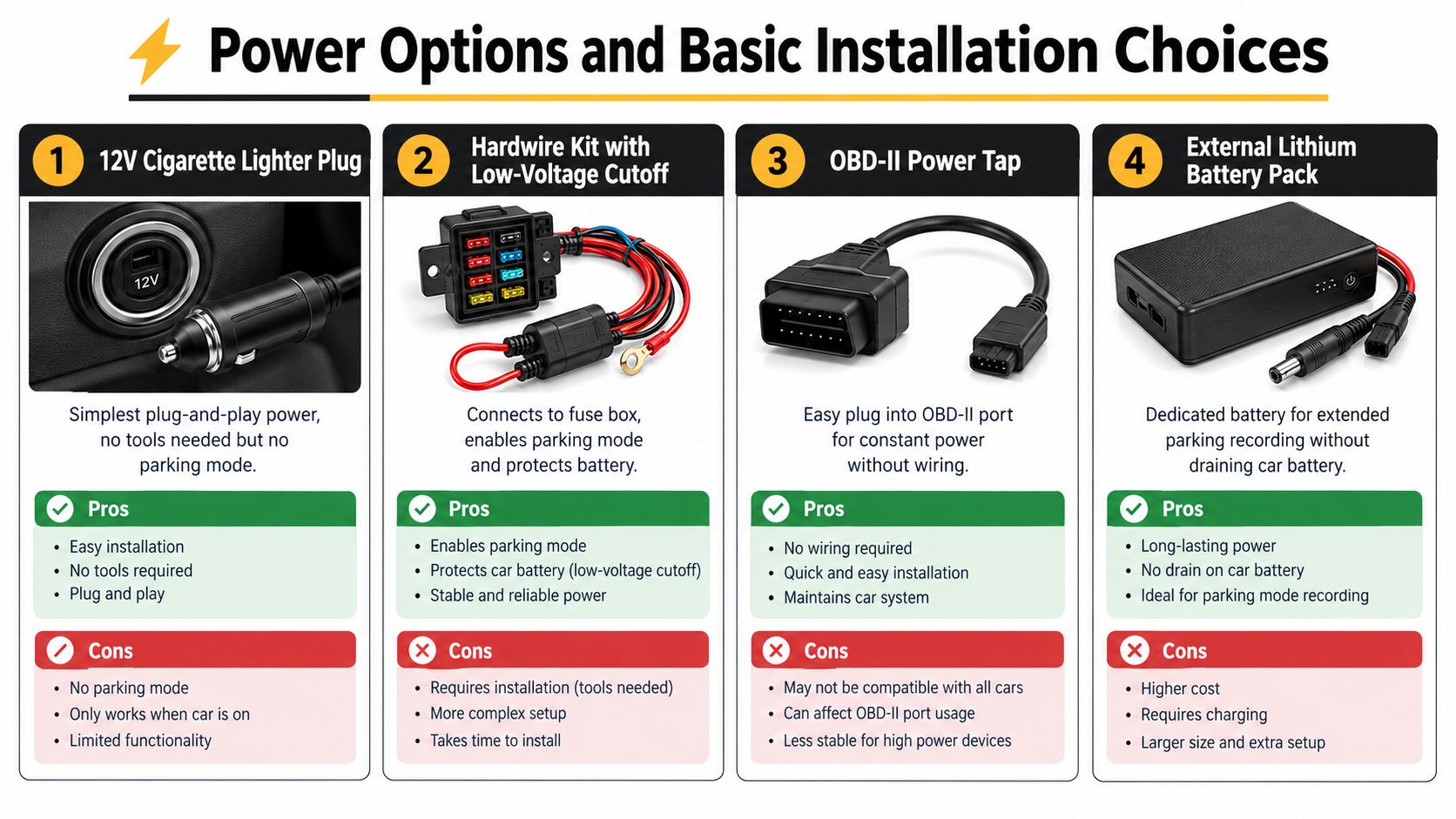
Power determines whether your camera protects the car only on the road or also while it's sitting outside your home, workplace, or airport. The easiest option is the 12V cigarette-lighter plug. It works well for a commuter who wants driving footage and doesn't need parking surveillance, but it usually stops when the switched socket loses power.
An OBD-II power tap offers a middle ground. It connects at the diagnostic port and can provide a convenient installation without routing wires through the fuse box. Check vehicle compatibility before buying, because constant power behavior and port access vary by vehicle.
A hardwire kit connects the recorder to selected circuits in the fuse box. It can provide accessory power while driving and constant power for parking mode, provided the kit includes a properly configured low-voltage cutoff. Independent guidance places hardwired parking draw around 100 to 500 mA, or approximately 0.1 to 0.5 A. At 0.2 A, that represents roughly 1.6 Ah over 8 hours and 4.8 Ah over 24 hours. On a 45 Ah battery, a full day at that draw could use about 10 to 11% of capacity, which is why battery health and cutoff settings matter, according to this dash cam power consumption guide.
An external lithium battery pack separates parking surveillance from the vehicle's starter battery. It costs more and needs its own charging arrangement, but it suits drivers who leave a vehicle parked for extended periods.
Installation details that affect reliability
Run the cable behind trim, keep it clear of airbags, and avoid placing the camera where it blocks the driver's view. A basic plug-in install needs little more than cable routing tools. Fuse-box work requires a fuse tap, trim tools, a multimeter, and confidence identifying switched and constant circuits.
Watch this installation overview for a practical visual reference:
Professional installation makes sense when the vehicle has complex trim, sensitive electronics, a headliner-mounted airbag, or a battery-management system that you don't want to disturb.
Real-World Use Cases From Security to Fleet
The right system changes with the driver. A parent using a family SUV doesn't need the same recorder as a delivery company managing several vehicles, and adding cameras without a clear purpose can increase installation complexity without improving the footage that matters.
A daily commuter may need one front camera, GPS, reliable loop recording, and a simple power connection. Someone who regularly parks on the street may benefit more from parking mode and a hardwire kit than from moving up to a higher resolution setting.
| Driver Type | Typical Channels | Key Features Needed | Example Benefit |
|---|---|---|---|
| Daily commuter | Front | Reliable loop recording, clear night video, GPS | Documents a disputed road incident |
| Family driver | Front and rear | Rear coverage, event locking, parking mode | Adds context to a rear-end collision |
| Parent of a new driver | Front, possibly cabin | GPS, stable timestamps, file access | Supports constructive review of driving events |
| Rideshare driver | Front, rear, and interior | Cabin coverage, privacy controls, cloud or app access | Documents vehicle and passenger-related disputes |
| Small fleet operator | Multiple channels | Remote access, GPS, durable storage, fleet management | Gives an operator visibility across vehicles |
| Delivery or utility driver | Front, rear, and cargo or side views | Robust mounting, event protection, expanded storage | Records road events and loading-area activity |
Rideshare drivers should think carefully about cabin recording. An interior view may clarify a passenger complaint, but audio and video privacy rules can differ by jurisdiction. A visible notice, a configurable microphone, and a clear retention policy are practical parts of the installation.
Fleet users often need more than a windshield camera. A vehicle recorder may combine front, rear, driver-facing, and cargo views with GPS and remote access. That setup can help managers review incidents without waiting for a vehicle to return, but it also requires stronger policies for storage, access, and employee privacy.
Evidence Reliability and the Recording Gap Problem
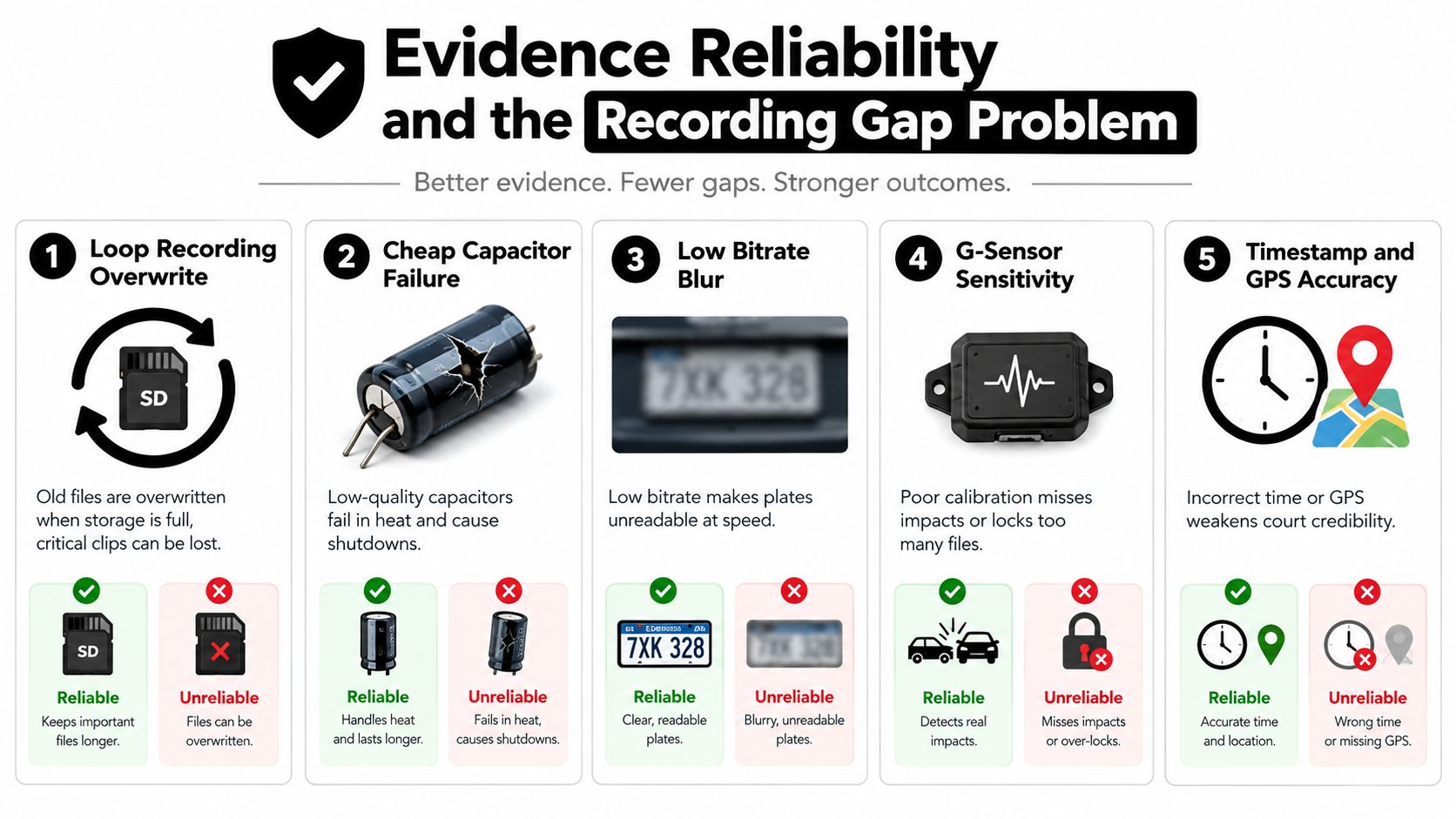
A camera can be recording without creating dependable evidence. The file may be blurred by insufficient bitrate, corrupted during an abrupt power loss, missing the impact because of a recording gap, or stamped with inaccurate time information.
Loop recording is especially easy to misunderstand. A documented discussion on continuous recording file gaps describes a 13-second gap between files. The cause can involve buffering, file segmentation, card performance, or power handling, but the practical lesson is simple. Don't assume that “continuous” on a product page means every moment has been preserved.
Test the system before trusting it
- Verify the card: Use a high-endurance card that meets the camera's stated write requirements.
- Test loop transitions: Record for long enough to create multiple files, then check whether playback moves cleanly from one file to the next.
- Trigger event locking: Simulate a controlled bump only where safe, then confirm the relevant clip is protected.
- Check parking mode: Test both motion and impact responses, and look for the pre-event portion if the system claims to buffer footage.
- Review timestamps: Compare the DVR clock with a trusted phone or time source.
- Inspect night footage: Look for plates, signs, and road edges in moving scenes, not just stationary objects.
A low-cost recorder may appear to save money until a collision produces a missing or unusable clip. Reliability comes from the complete system, including the camera, card, power supply, mounting, firmware, and the way you retrieve and preserve files.
Before an incident happens: Download important footage promptly, keep the original file unchanged, and make a separate copy for sharing with an insurer or attorney.
Choosing the Right Setup and Buying Checklist
Start with the event you want to document. A single front camera suits many commuters. Add a rear camera when rear impacts, tailgating, or complete road context matters. Add an interior camera for rideshare, family oversight, or commercial use, but account for privacy before activating audio or cabin recording.
Power follows the same logic. If the car is normally parked in a garage and you only need driving coverage, a 12V connection may be enough. If parking incidents are a concern, choose a hardwire kit with low-voltage protection or an external battery solution.
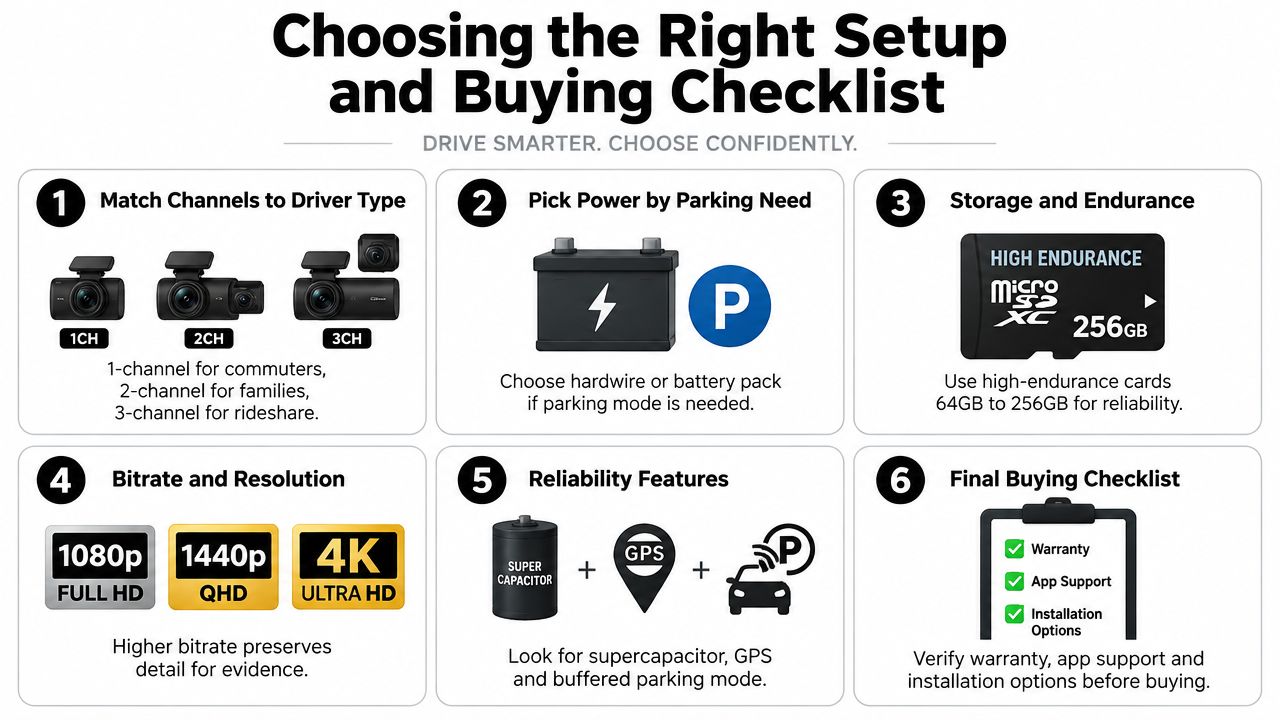
A practical buying sequence
- Confirm the essentials: Look for loop recording, event locking, dependable power-loss handling, and a compatible high-endurance card.
- Match quality to conditions: Compare bitrate alongside resolution, then inspect night samples at realistic driving speeds.
- Choose storage deliberately: Confirm the card type, supported capacity, and overwrite behavior.
- Add context features: GPS helps connect footage with route and timing information, while Wi-Fi simplifies file transfer.
- Decide on connected access: LTE and cloud services can help monitor a parked vehicle, but they add service and privacy considerations.
- Plan the install: Check cable routing, camera placement, fuse access, and whether professional fitting is appropriate.
Before you leave a store or complete an online installation, format the card in-camera, confirm the camera records continuously, review a file transition, and compare the timestamp with your phone. Choose the simplest setup that covers your actual risk. Spend first on dependable recording and power, then add channels and connected features when they solve a specific problem.
Practical Questions Drivers Ask Before Installing
Footage is more credible when it's continuous, unaltered, and paired with accurate timestamps. GPS time synchronization can help, but local rules determine how footage is treated, so preserve the original files and check requirements before relying on them in a dispute.
Use a high-endurance card, format it in-camera regularly, and replace it when the manufacturer or the card's condition indicates it's nearing the end of its service life. Heat, vibration, and constant overwriting are harder on storage than ordinary household camera use.
Mounting rules vary. Some jurisdictions restrict objects near the windshield or mirror sweep, so place the camera without obstructing the driver's view. Audio recording can also require consent in some places, particularly for rideshare passengers. Configure the microphone and cabin camera with local privacy rules in mind.
Audio Jam Inc offers dash cam products and professional installation, including front and rear systems and 360-degree setups, along with related GPS and vehicle-safety accessories. If you want help matching channels, parking power, and clean wiring to your car, visit Audio Jam Inc to shop options or arrange an installation.