

Best Head Units for Cars: A Practical Buyer Guide

You're probably shopping for a head unit because your factory radio is doing at least one thing badly. Maybe maps lag when you need a turn right now. Maybe your phone is stuck on a vent mount and you're poking at a tiny screen in traffic. Maybe the sound is flat, the backup camera looks awful, or the whole system feels old every time you start the car.
That's the reason people replace radios now. It's not about getting a louder stereo just for the sake of it. A modern head unit changes how you use the vehicle every single day. The right one gives you fast navigation, clean phone integration, better call quality, easier camera use, and enough tuning control to make even modest speaker upgrades sound much better. The wrong one gives you lag, glare, weak outputs, flaky wireless pairing, and an install that breaks factory features.
The best head units for cars aren't one universal list. The right pick for an older single-DIN pickup is different from the right pick for a commuter Camry, a Wrangler trail rig, or a boat that gets blasted by sun and spray. That's where most roundups miss the mark. They rank screens and features, but they skip the ugly part that decides whether you'll be happy: fitment, wiring, factory integration, and how you really use the vehicle.
Table of Contents
- What the Right Head Unit Actually Does for Your Drive
- Head Unit Types and Form Factors Explained
- Must-Have Features That Actually Matter
- Wired Versus Wireless Smartphone Integration
- Vehicle Fit and Installation Reality
- Best Picks by Price Tier and Use Case
- When Professional Installation at Audio Jam Is Worth It
What the Right Head Unit Actually Does for Your Drive
You feel a good head unit in the first few minutes of a commute.
You start the car, your phone connects, maps come up fast, music resumes where it left off, and the screen responds the first time you touch it. No fumbling. No waiting for a cheap interface to wake up. No late reroute because the system dragged its feet.
It's the control center, not just a radio
Older car radios were simple. That's how the category started. Car head units trace back to early U.S. experiments in the 1920s, with mass car radio installation starting around 1929, Europe's first head unit arriving in 1932, dashboard station-selection buttons showing up in 1951, the first AM/FM in-car head unit from Blaupunkt by 1952, and Becker's Europa in 1969, widely cited as the first car stereo. That progression is outlined in TechRadar's history of the car head unit.
Today, the head unit sits in the middle of almost everything the driver touches. It handles phone calls, music, maps, voice commands, reverse camera display, and in many vehicles it also has to play nicely with steering wheel controls and factory data systems.
Why an aftermarket unit changes daily habits
A quality aftermarket receiver fixes the stuff drivers complain about most:
- Navigation access: CarPlay and Android Auto put maps where you can see them.
- Hands-free use: Calling and messaging become usable instead of annoying.
- Sound tuning: Better EQ, time alignment, and crossover control help correct the cabin, which is one of the worst listening environments on earth.
- Camera support: Backup camera inputs and better screens make parking less stressful.
Practical rule: If the feature affects you every time you start the vehicle, pay for it. If it only looks good on a spec sheet, skip it.
The market has moved in the same direction. Automotive infotainment has shifted from simple audio to connected infotainment hubs, with one forecast placing the global automotive infotainment market at USD 14.99 billion in 2023 and projecting USD 28.93 billion by 2030 at 9.9% CAGR, while another estimate places the in-car infotainment market at USD 22.49 billion in 2024 and projects USD 42.19 billion by 2030 at 11.5% CAGR. The same market analysis notes that audio units account for 28.5% of the 2025 automotive infotainment market, and Bluetooth is built into 96.2% of head units sold. That snapshot from Grand View Research's in-car infotainment market analysis tells you one thing clearly: wireless phone integration is no longer a bonus feature people shrug at.
What matters now is choosing the unit that matches the vehicle. A family commuter needs one kind of setup. A truck with amp upgrades needs another. A Jeep that sees dust, vibration, and off-road angles is its own category.
Head Unit Types and Form Factors Explained
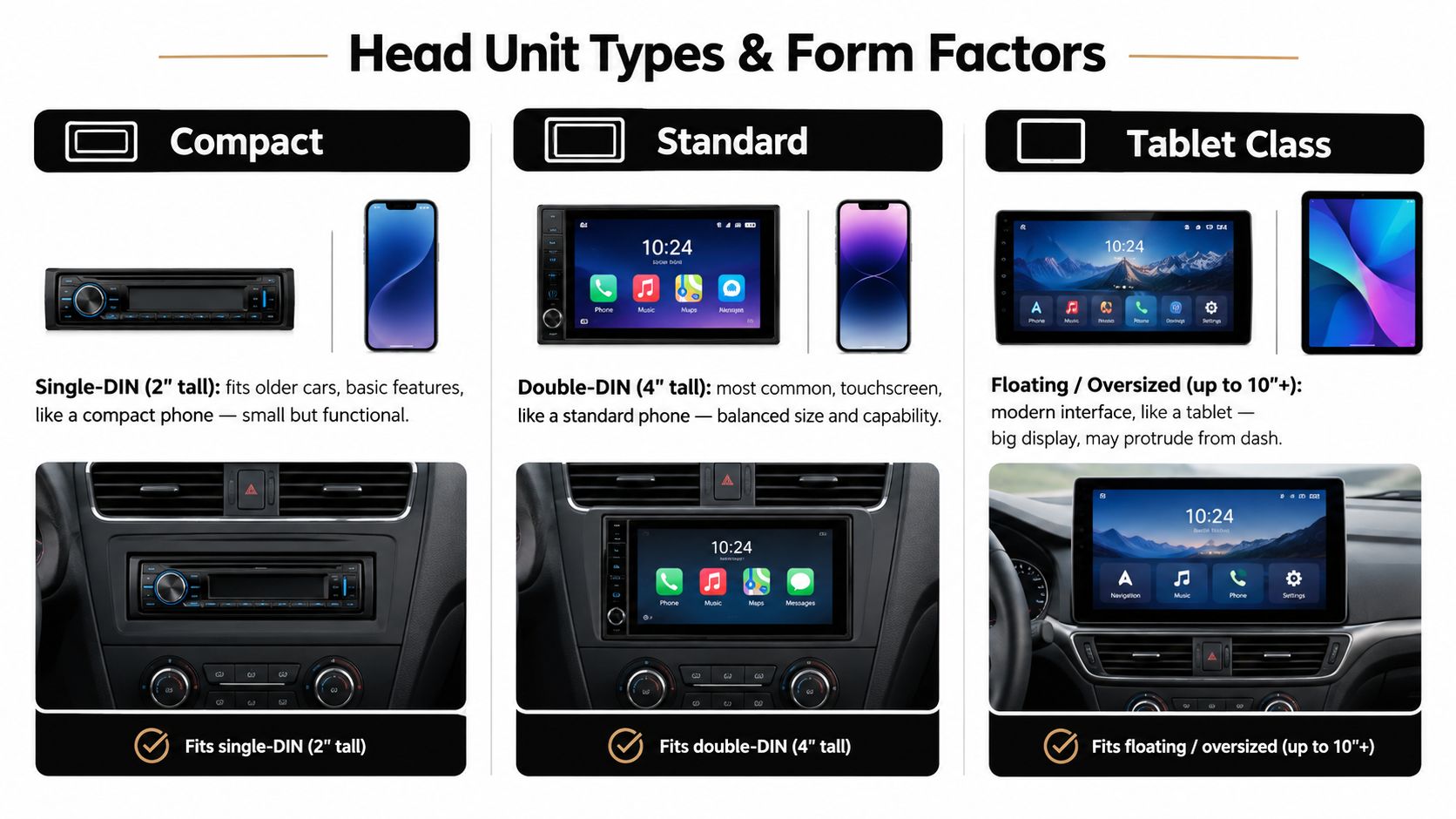
Think of head units the same way you think about phones. There's compact, standard, and tablet-sized. Your dash decides what class you can use cleanly.
Single-DIN works when the vehicle is old or tight
Single-DIN is the tall, narrow format still common in older cars, work trucks, and basic dash layouts. If you've got an early-2000s pickup or a simple commuter with limited dash space, this is often the cleanest answer.
A single-DIN unit makes sense when you need:
- Tight fitment: Older dashboards often don't leave much room.
- Basic modernization: Bluetooth, USB, and phone integration matter more than a giant screen.
- A simpler install: Less trimming, less plastic surgery, fewer surprises.
Some single-DIN multimedia models use a pop-out or floating display. Those can work great, but they can also block vents or buttons if the dash layout is crowded. Measure first, not after you've opened the box.
Double-DIN is the sweet spot for most drivers
Double-DIN is the standard choice for a reason. It gives you the most normal-looking touchscreen install and usually fits best in sedans, crossovers, and plenty of SUVs. A Camry, Accord, Civic, Corolla, or similar daily driver usually lands here.
This is the format I recommend first when the dash allows it. You get enough screen to make CarPlay or Android Auto useful without turning the dash into a science project.
Floating screens solve some fit problems and create others
The oversized floating-screen units are for drivers who want a modern interface but don't have a deep traditional double-DIN touchscreen cavity. They're common in trucks, Tacomas, Wranglers, Gladiators, and some vans where a bigger display is nice but the dash opening is awkward.
Bigger screens are easier to read. They're also easier to regret if they block HVAC controls, hazard buttons, or your line of sight.
Most modern recommendations are mech-less, meaning no CD or DVD transport. That's a good thing. Fewer moving parts means fewer failure points, especially in trucks, Jeeps, and anything that sees vibration.
Must-Have Features That Actually Matter
Forget the flashy ad copy. A head unit lives or dies by a short list of features you'll touch every day. If you get these right, the system feels current for years. If you get them wrong, the radio feels cheap by the second week.
Start with phone integration, then sound, then retention
For most buyers, the priority stack is simple:
- Apple CarPlay and Android Auto
- A usable screen
- Steering wheel control retention and camera support
- Real audio tuning
- Clean preamp outputs if you'll add amps
Built-in navigation used to be a selling point. It isn't anymore. Phone mirroring wins because your maps stay updated, your voice assistant works better, and you're not stuck with clunky onboard software.
What's worth paying for
A quality multimedia receiver should have:
- CarPlay and Android Auto: This is essential for most daily drivers.
- A screen you can read quickly: I'd treat 7-inch as the minimum and larger screens as a convenience upgrade if the dash supports them.
- Responsive touch input: Laggy touchscreens ruin the whole point of the upgrade.
- Bluetooth that behaves: Streaming and calling should connect consistently and sound clean.
- DSP features: Time alignment, EQ, and crossover control matter more than fake sound modes.
- Strong pre-outs: Reviews of higher-end units consistently highlight 4V pre-outs, 13-band EQ, time alignment, and multi-way crossover controls because those features help feed amplifiers cleanly and give installers real tuning control. That's called out in CarAudioNow's single-DIN head unit guide.
- Backup camera input: If your vehicle has one now, you'll want to keep it. If it doesn't, leave yourself the option.
- Steering wheel control compatibility: Losing track, volume, and call buttons gets old fast.
| Feature | Daily Impact | Worth Paying Extra? |
|---|---|---|
| CarPlay / Android Auto | Very high | Yes |
| Screen size and visibility | High | Yes |
| Touch response | High | Yes |
| Bluetooth call and streaming quality | High | Yes |
| Backup camera input | High for most drivers | Yes |
| Steering wheel control retention | High | Yes |
| DSP tuning controls | Medium to high | Yes, if you care about sound |
| 4V pre-outs | Medium to high | Yes, if adding amplifiers |
| Built-in navigation | Low for most buyers | Usually no |
| DVD playback | Low | No |
| Gimmick sound modes | Low | No |
Don't get distracted by dead features
DVD playback is dead weight for most builds. Built-in nav feels old the minute your phone does a better job. “Virtual surround” and similar presets usually make the system worse, not better.
Buy the radio for the interface, the integration, and the signal path. Don't buy it for toy features you'll stop using.
If you're deciding where to spend, put the money into phone integration, screen quality, and audio tuning hardware. Those are the features that still matter after the excitement of a new screen wears off.
Wired Versus Wireless Smartphone Integration
This choice is where marketing and real-world use part ways.
Wireless sounds better on paper. Wired usually behaves better in the car.
What the driver actually feels
Independent buyer guides consistently report that wired Apple CarPlay and Android Auto connect faster and stay more stable than wireless, while wireless adds a short boot and pairing delay that can affect map refreshes, call handoff, and repeated ignition cycles. That practical difference is summarized in CarAudioNow's head unit roundup.
That lines up with what installers see every day. A wired connection starts faster, drops less often, and gives the driver a more predictable system. Wireless is convenient, but it asks more from the head unit, the phone, and the vehicle environment.
Who should choose which
| Factor | Wired | Wireless |
|---|---|---|
| Startup speed | Faster | Slower at initial connection |
| Stability | More consistent | More dependent on pairing and environment |
| Charging | Yes, if connected to data-capable USB | No, unless you add separate charging |
| Dash cleanliness | Cable visible | Cleaner look |
| Repeated short trips | Fine if you plug in every time | More convenient |
| Budget value | Better | Costs more to get right |
Wired is the smart pick for:
- Daily commuters who use maps every morning
- Drivers on a tighter budget
- Anyone adding amplifiers and caring about predictable behavior
- People who already plug in their phone to charge
Wireless makes sense for:
- Ride-share drivers
- Drivers hopping in and out all day
- Multi-driver households switching phones
- Anyone who hates cables more than they hate occasional delay
My rule is simple. If you want the fewest headaches, buy wired or buy a wireless unit from a reputable line and expect to pay more for the cleaner experience.
Vehicle Fit and Installation Reality
People make expensive mistakes here. The radio you want is only half the job. The other half is whether it fits your dash, works with your wiring, and keeps the factory features you already paid for.
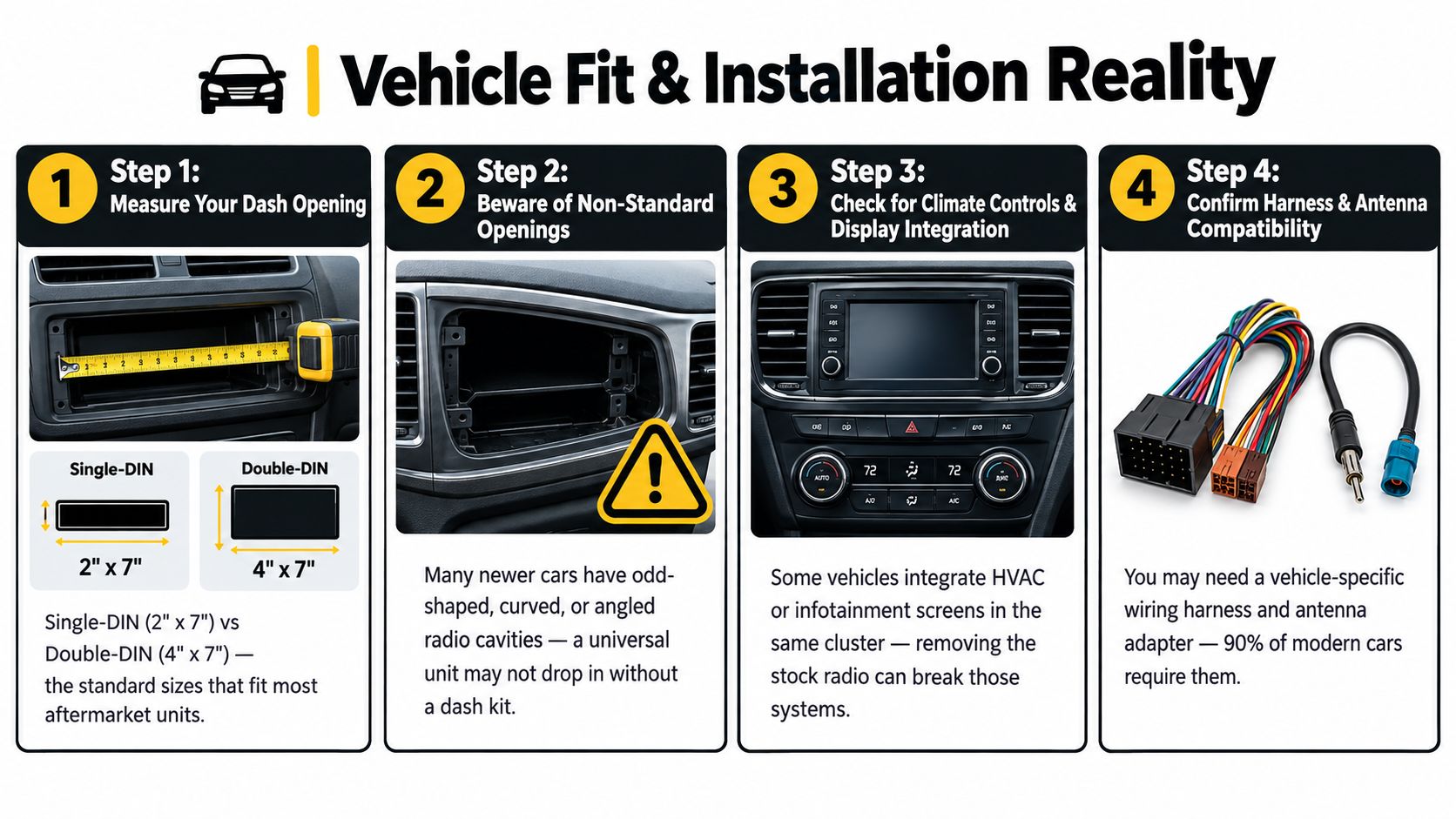
Dash opening is only the first question
People fixate on single-DIN versus double-DIN. That matters, but it's not enough. Plenty of modern dashboards use odd shapes, angled trim, shallow openings, or factory panels that need a vehicle-specific kit to look right.
A clean install usually depends on three things:
- The physical opening
- The trim kit
- The depth and clearance behind the dash
That's why a floating screen can be the right answer in one truck and a terrible answer in another.
The harness matters as much as the radio
Cheap universal wiring is where clean installs go to die. You want vehicle-specific integration parts, not a bag of guesswork and butt connectors. If the vehicle has steering wheel controls, retained accessory power, warning chimes, or data-driven functions, the harness and module choice decides whether those still work after the swap.
Common pain points include:
- Steering wheel controls stop responding
- Factory chimes disappear
- The radio doesn't turn on and off correctly
- Battery drain from poor data integration
- OEM camera signal not converting cleanly
Many generic “best head units” roundups barely touch this. That gap is exactly what this 2026 review overview of head unit coverage calls out. Universal rankings are easy. Explaining what works in older vehicles, single-DIN dashes, and modern OEM-integrated interiors is harder.
Here's a walkthrough before you buy:
OEM integration traps people underestimate
Factory amplified systems are the first trap. Bose, Harman Kardon, JBL, and similar systems often need the correct interface strategy so the aftermarket radio plays nicely with the factory amp.
Then there's camera retention. Some factory cameras use signals that don't drop straight into an aftermarket screen without the right adapter. Some vehicles route vehicle settings or climate information through the radio area, which turns a “simple stereo swap” into a much bigger decision.
If the factory radio is tied into vehicle settings, camera display, or amplified audio, stop treating it like a basic radio replacement. It isn't one.
DIY is realistic when the vehicle is older, the dash is standard, and the system is not integrated. If it's a newer truck, a premium-audio SUV, or anything with data modules and factory screen dependencies, that's where professional installation starts making sense fast.
Best Picks by Price Tier and Use Case
Don't shop head units by brand first. Shop by vehicle, daily use, and how much integration pain you're willing to pay to avoid.
Budget tier for simple commuters
If you've got a Civic, Corolla, older Accord, base-model sedan, or a straightforward crossover, the budget tier should focus on one thing: a reliable double-DIN mech-less receiver with wired CarPlay or Android Auto.
That setup fits the driver who wants:
- Modern maps
- Hands-free calling
- USB music and charging
- A backup camera input for later
- A clean factory-looking install
Installed price at this level is usually the lowest when the vehicle has a standard opening and no premium OEM audio. Don't waste budget money on built-in nav or gimmick features. Put it into a decent screen and dependable phone integration.
Mid-range for the driver who uses the system every day
This is the sweet spot. You're stepping into wireless CarPlay or Android Auto, a better screen, better responsiveness, and stronger audio outputs for future amp upgrades.
This is the right tier for:
- The daily commuter who lives in maps and calls
- The family vehicle where camera use matters
- The driver planning speakers, a sub, or amplifiers next
- Anyone who's tired of cheap-screen lag
A mid-range unit should also be where you start demanding proper DSP features, better pre-outs, and better steering wheel control integration. If you're building the system in stages, this is the smart long-term buy.
Truck and Jeep picks need tougher priorities
A Wrangler, Gladiator, Tacoma, older Silverado, or work truck needs a different filter. Vibration, dust, awkward dash geometry, and shallow mounting space punish flimsy gear.
For trucks and Jeeps, prioritize:
- Shallow-fit compatibility where needed
- Good daylight visibility
- Solid button design or usable touch response while bouncing around
- Strong pre-outs for external amps
- A brand ecosystem with known harness support
Floating-screen units often make a lot of sense here because they can give you a larger usable display without demanding a full deep touchscreen chassis behind the dash. But they only make sense if they don't block vents, climate knobs, or transfer-case controls.
Marine and UTV setups are their own category
A boat, side-by-side, or open off-road toy shouldn't use the same head unit you'd put in a commuter sedan. Marine and powersports environments need weather-ready, UV-stable, and vibration-tolerant equipment from lines built for that use.
Think in terms of brands and product families that offer marine-grade ecosystems, not bargain car radios pretending to be rugged. JL Audio, Rockford Fosgate, and Wet Sounds are the kinds of names people usually look at in these environments because the install conditions are harsher and the consequences of cheap gear show up fast.
| Price Tier | Typical Features | Best Use Case | Installed Price Range |
|---|---|---|---|
| Budget | Wired CarPlay/Android Auto, basic touchscreen, Bluetooth, camera input | Older commuter cars, basic daily drivers | Varies by vehicle and integration needs |
| Mid-range | Wireless phone integration, better screen, stronger pre-outs, more tuning control | Modern daily drivers, family vehicles, staged audio upgrades | Varies by vehicle and integration needs |
| Truck and Jeep focused | Better visibility, fit solutions for awkward dashes, stronger outputs, rugged usability | Wrangler, Gladiator, Tacoma, pickups, off-road builds | Varies widely with dash kit and integration |
| Marine and UTV | Weather-resistant design, sealed controls, outdoor-ready hardware | Boats, side-by-sides, open-air powersports vehicles | Varies widely based on environment and wiring |
If you want a practical shopping path, a local retailer such as Audio Jam Inc can match Sony, Alpine, Pioneer, Kenwood, JVC, LINKSWELL, or BOSS ELITE options to the actual vehicle instead of forcing a generic top-10 list onto every dash.
When Professional Installation at Audio Jam Is Worth It
A lot of DIY installs go wrong in ways that don't show up until the vehicle is back together. The radio powers on, so the installer thinks the job is done. Then the factory amp hisses, the camera doesn't trigger, the steering wheel buttons map wrong, or a warning chime disappears.
That's the difference between “it turns on” and “it's integrated.”
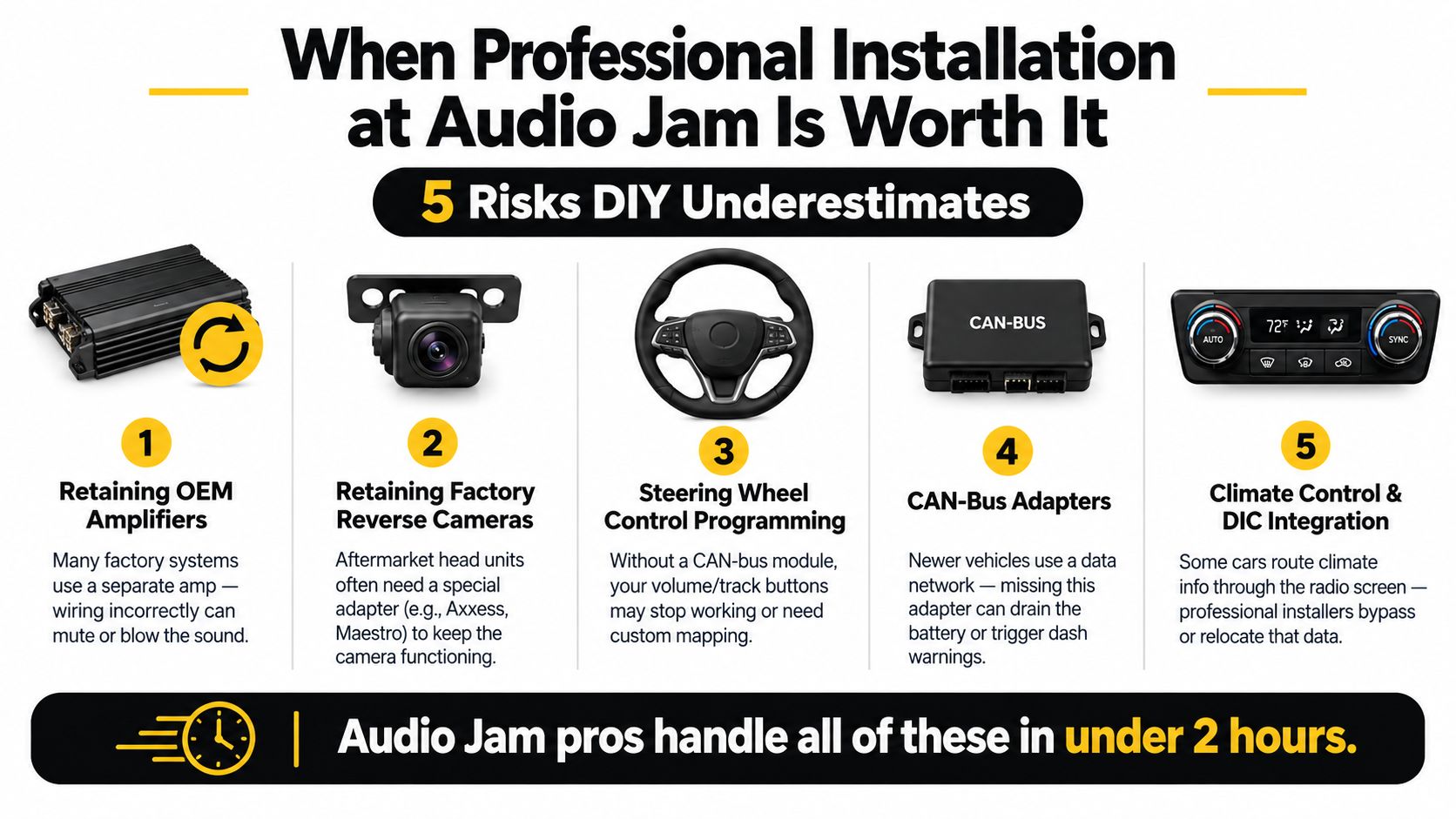
The vehicles that usually justify pro install
Professional installation is usually worth booking when the vehicle has:
- A factory amplifier
- A retained OEM reverse camera
- Steering wheel controls that need programming
- CAN-bus data dependencies
- Climate or vehicle settings tied to the stock radio
- A non-standard dash shape
- Marine or powersports exposure
Newer Ford and GM vehicles, many European imports, and trims with Bose, JBL, or Bang & Olufsen style premium audio are the common examples. Those aren't hard because the radio is magical. They're hard because the car expects the radio to communicate with other systems.
What a proper install actually includes
A real install job starts before the dash comes apart. You check fitment, choose the harness and data modules, confirm antenna and camera retention parts, and verify what the factory system is doing.
Then the installer tests the signals, confirms turn-on behavior, programs steering wheel controls if needed, and tunes the output so the upgraded head unit doesn't just work, but sounds right. Marine and UTV installs add another layer because wiring, connection sealing, and mounting method matter a lot more when water, dust, and vibration enter the picture.
The more factory features you want to keep, the more valuable the installer becomes.
Quick self-check before you decide
You should lean toward professional installation if any of these apply:
- Your vehicle is newer and heavily integrated: Factory screens and data systems add complexity fast.
- You have premium OEM audio: Factory amps need the right signal strategy.
- You want to retain camera and steering controls: These are common failure points in rushed installs.
- You care about warranty-backed workmanship: That matters when trim panels, modules, and tuning are part of the job.
If your vehicle is older, standard, and lightly integrated, DIY can be fine. If it isn't, paying for the right install is cheaper than buying parts twice and chasing electrical issues later.
Audio Jam Inc sells and installs head units, CarPlay and Android Auto receivers, integration modules, speakers, amplifiers, and camera-friendly upgrades for cars, trucks, Jeeps, marine builds, and UTVs. If you want help choosing the right unit for your exact vehicle and avoiding the fitment and wiring mistakes that trip people up, visit Audio Jam Inc.