

Car Stereo with Aux Input: What It Is and How to Choose

You've just bought an older sedan, truck, or SUV. The radio works, the speakers work, and there's a small round hole on the dash labeled AUX. Your phone has no headphone jack, the cable in your glove box crackles, and you aren't sure if plugging in will sound good, sound awful, or do nothing at all.
That's the normal starting point for a car stereo with aux input. The jack itself is simple. Getting clean sound from it depends on your phone's output, the cable or adapter you use, the car's grounding, and the stereo's input stage.
Table of Contents
- What an Aux Input Is and Why It Still Matters
- Aux, Bluetooth, USB and CarPlay Compared
- How Sound Quality Works Over an Aux Connection
- Driver Safety and Daily Use With Aux
- Confirm Your Head Unit Before You Buy
- How to Connect an Aux Input Without Noise
- Fixing Hum, Hiss and Low Volume
What an Aux Input Is and Why It Still Matters
Think of the aux jack as a doorway for sound, not a brain. Your phone decodes the music and turns it into analog audio. The stereo doesn't read files or apps through that doorway. It only receives the finished sound, then controls volume, tone, and amplification through the car speakers.
That doorway is usually a 3.5 mm stereo jack. It accepts a line level signal from a phone, tablet, or music player. Once you know what each contact carries, one sided audio and headset plug problems make more sense.
What Each Contact Carries
| Contact | Carries | Notes for a car stereo |
|---|---|---|
| Tip | Left channel audio | Signal conductor for the left speaker feed |
| Ring | Right channel audio | Signal conductor for the right speaker feed |
| Sleeve | Ground reference | Shared reference and shield; the source of ground-loop noise |
| Extra ring (TRRS) | Microphone or video, depending on the device | Phone headset plug; may not align with a TRS aux socket |
The split matters when you buy a cable. A standard TRS plug has tip, ring, and sleeve. A TRRS headset plug adds a contact for a microphone. That extra ring can sit in the wrong place inside a stereo's TRS socket, so you may get weak sound, one channel, or no sound even though the plug looks like it fits.
Aux arrived when portable music moved into cars. After Apple's iPod launched in 2001, automakers added AUX inputs, USB connections, and MP3 compatibility so external players could feed audio directly into the vehicle stereo, as Kelley Blue Book's history of in-car entertainment describes. That same history notes the iPhone 7, introduced in 2016, was the first iPhone without a 3.5-mm headphone jack.
Practical rule: If a device can send analog audio out of a headphone output, an aux input can usually play it. You don't need an app, account, pairing code, or brand specific data interface.
That's why the jack still matters in older cars without factory Bluetooth. It's brand neutral, cheap to use, and easy to test. You can now identify the jack, tell TRS from TRRS, and know that only left audio, right audio, and a ground reference travel through it.
Aux, Bluetooth, USB and CarPlay Compared
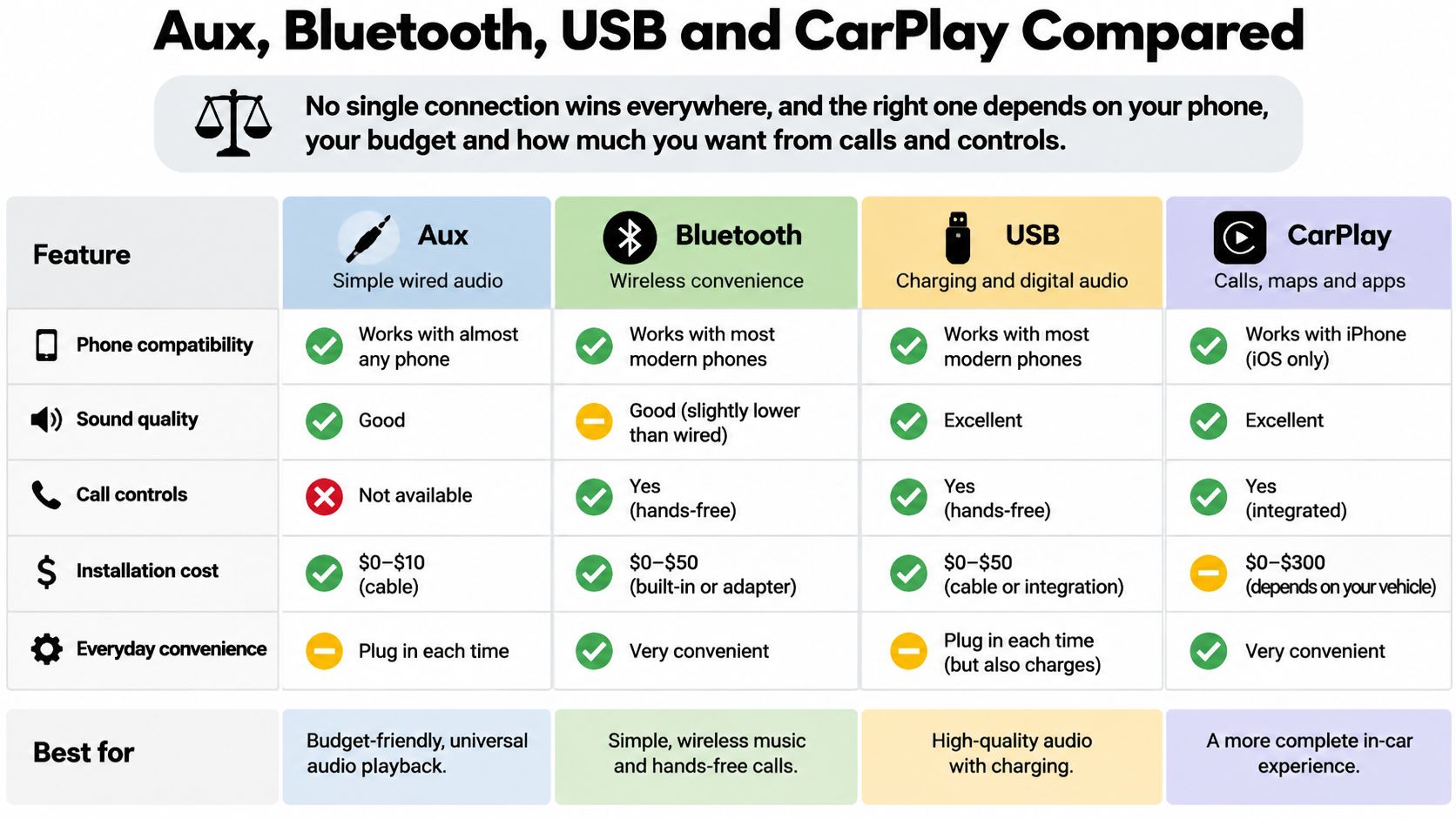
No single connection wins everywhere, and the right one depends on your phone, your budget and how much you want from calls and controls.
The chart below puts the four common paths side by side before you spend money on cables or a new head unit.
| Connection | Signal path | Phone requirement | Charging while playing | Calls and voice | Track information |
|---|---|---|---|---|---|
| Direct AUX | Analog, converted inside the phone | 3.5 mm output or adapter | No | None built in | None |
| Bluetooth | Compressed digital, decoded in the head unit | Pairing only | Not included | Hands-free calls on most units | Often shown on display |
| USB | Digital, decoded by the head unit or phone | USB cable and compatible port | Often yes | No, unless the head unit also has Bluetooth | Often shown on display |
| CarPlay or Android Auto | Digital, through the phone's app | Compatible phone and cable or wireless link | Often yes | Voice assistant and calls | Full app and track display |
Three differences explain most buying decisions.
- Sound path: Aux is analog, so your phone or adapter performs the digital to analog conversion and the stereo only amplifies what's sent. Bluetooth sends compressed digital audio for the head unit to decode. USB and CarPlay keep the signal digital longer, which gives the head unit more control.
- What you lose with aux: There's no built in hands free calling, voice assistant, steering wheel track control, or track metadata. You change songs on the phone itself, which matters for safety and convenience.
- Charging: Aux carries audio only, so it doesn't charge your phone. USB and wired CarPlay often charge while they play. Bluetooth doesn't charge either, but it removes the audio cable.
Aux hasn't disappeared. Market data in Dataintelo's global car audio head units report indicates Bluetooth appeared in 96.2% of head units sold in 2025, while AUX remained in 72.1%. That positions aux as a common compatibility fallback rather than the main interface on newer units.
Say you drive a 2008 car with only an aux jack. A cable or a Bluetooth to aux receiver gets your playlists playing today, but you won't get maps, caller display, or charging from that jack. Say you drive a 2022 car with Bluetooth and CarPlay. You'll likely use aux only for an older player, a passenger's device, or a backup when wireless pairing fails.
If you're weighing the app based options, compare the features in this guide to Apple CarPlay and Android Auto integration before you decide that aux alone is enough.
The short video below shows how these connection choices look in a real dash, which helps if you're still picturing where cables and controls sit.
Don't assume aux automatically sounds better because it's wired. It can avoid Bluetooth compression, but a cheap adapter, a damaged cable, poor grounding, or a noisy input stage can erase that advantage.
How Sound Quality Works Over an Aux Connection
A phone at 40% volume into a head unit turned up high usually sounds hissy. The same phone at about 80% volume with the head unit at a moderate setting usually sounds cleaner. That one example explains most aux sound quality.
You're balancing two volume controls. If the source signal is too low, the stereo has to amplify everything, including background hiss from the phone, adapter, and cable. If the source is pushed to maximum and starts to distort, the stereo will faithfully amplify that distortion too.
Signal Level and Impedance in Plain Language
Your stereo's aux port is typically an unbalanced, stereo line level interface. A comparable professional audio input design using a 3.5 mm TRS jack specifies input impedance above 10 kΩ and accepts approximately 1.2 Vrms at a -10 dBV sensitivity setting, while another technical reference lists about 1 Vrms as a typical maximum for 3.5 mm audio connections, according to the Hardware Book 3.5mm TRRS reference.
You don't need to memorize those numbers. You need what they mean for your ears. Input impedance is how hard the stereo makes your phone work to deliver the signal.
A high impedance input loads the phone lightly. That helps preserve output level and frequency response, so bass doesn't thin out and volume doesn't sag. A low impedance load makes the phone's small output stage work harder. That can reduce volume, increase distortion, and change the tonal balance.
A good aux input should feel like an easy load for the phone, not like a pair of demanding headphones.
Headphones are a useful contrast. They're designed to draw power and move tiny drivers near your ears. A car stereo input shouldn't do that. It should take a voltage signal, keep it intact, and let the head unit's amplifier do the heavy work for the car speakers.
Three Settings That Protect Sound Quality
- Use a short, shielded stereo cable: Shorter cable picks up less interference, and shielding helps reject electrical noise around the dash. Replace a cable that crackles when you wiggle it.
- Set a healthy source level: Start with the phone or adapter high enough to give a strong signal without clipping, then control listening volume at the head unit.
- Don't rely on maximum source output: If loud passages sound harsh, back the phone down a step and raise the receiver instead.
Check your head unit manual for its own input limits. Connector shape alone doesn't define the electrical level a specific stereo expects. Two jacks can look identical and still have different sensitivity, which is why one car sounds loud at a low setting and another needs more volume for the same phone.
Driver Safety and Daily Use With Aux
A newer touchscreen isn't automatically safer than a simple aux stereo. What matters is how much you have to look at, reach for, and tap while the car is moving.
A 2024 on-road study found that visual-manual interaction caused more distraction than auditory-speech interaction, while music and navigation tasks were among the most distracting activities, according to the 2024 Scientific Reports study on in-vehicle interaction. A separate simulator study described there found touch based music selection through Android Auto increased reaction time measures and produced off road visual behavior exceeding NHTSA guidance in several tasks, whereas voice control performed better on the measured criteria.
Where Aux Helps and Where It Hurts
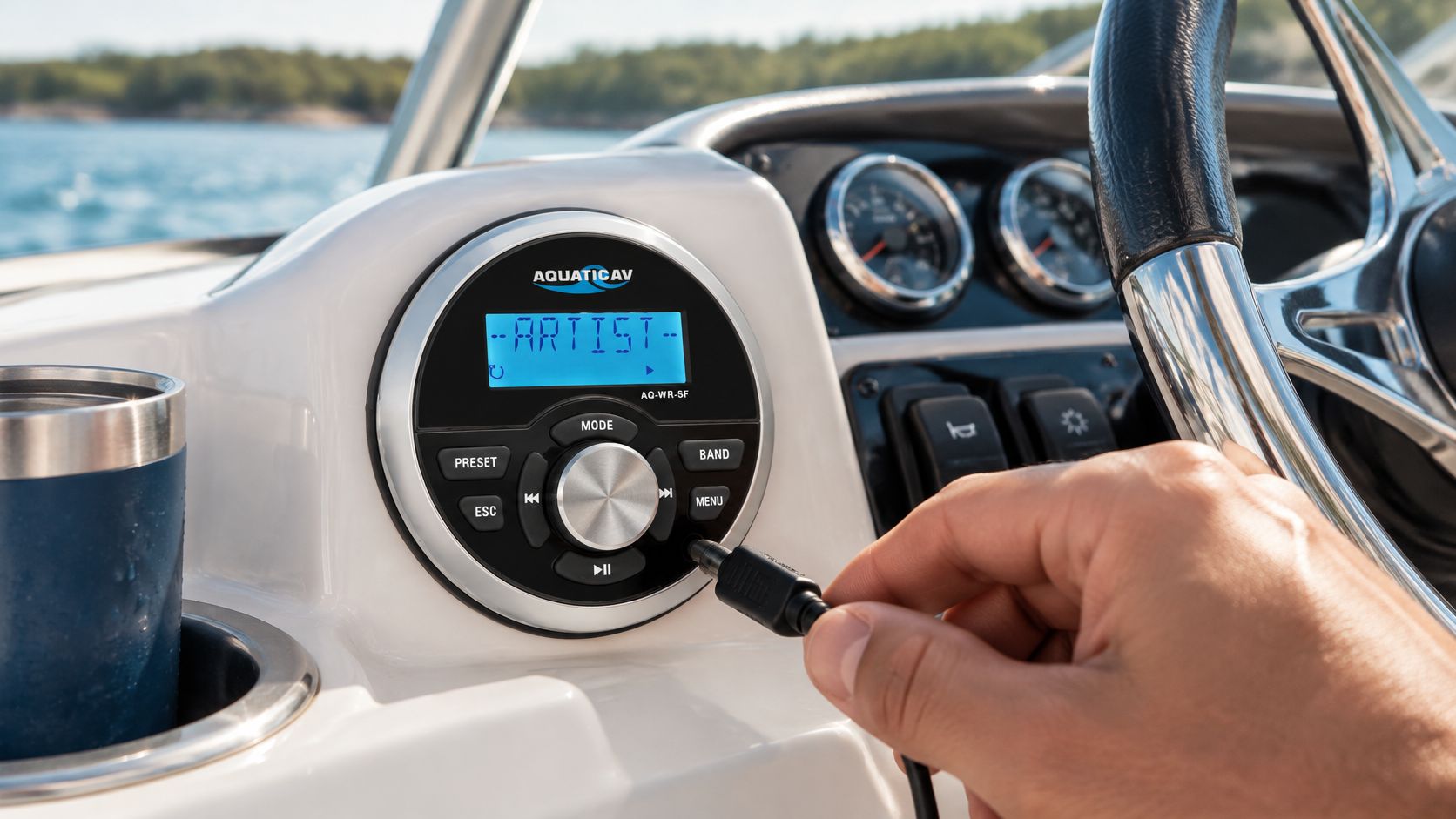
A basic receiver with a physical volume knob can be easy to use by feel. If your playlist is already running, you may only need to turn the knob or press pause on a large button. There are no menus to hunt through and no screen to read.
The receiver shown here is an example of large, tactile controls that you can operate without studying a touchscreen.
Aux creates a different risk when you want more than that playlist. It has no voice assistant, caller interface, or track browsing on the stereo display. Skipping albums, searching podcasts, reading a caller name, or answering a call pulls you back to the phone.
Compare the three control methods. Physical controls are fastest for volume and pause because your hand learns where they are. Voice control keeps your eyes forward for calls and selection, but aux alone doesn't provide it. Phone handling gives you full browsing, and it's also the method most likely to take your eyes off the road.
Older vehicles and DIY installs may also lack factory steering wheel integration. Without that interface, even a simple track skip can mean reaching for a phone in a cup holder. Check your local hands free laws before you rely on any setup that requires touching the phone while driving.
A Set It Before Moving Routine
- Start the playlist before you shift into gear: Pick the album, podcast queue, or station while you're parked.
- Set both volumes while stopped: Put the phone at a healthy level, then set the head unit so you won't need large adjustments later.
- Use the knob, not the phone: Make small volume changes by feel. Pull over before you search, change apps, or answer a call that needs the handset.
Aux is safest when your listening is planned and simple. If you take frequent calls, use navigation prompts all day, or change music often, Bluetooth hands free or voice capable CarPlay and Android Auto may reduce phone handling even if the screen looks more complex.
Confirm Your Head Unit Before You Buy
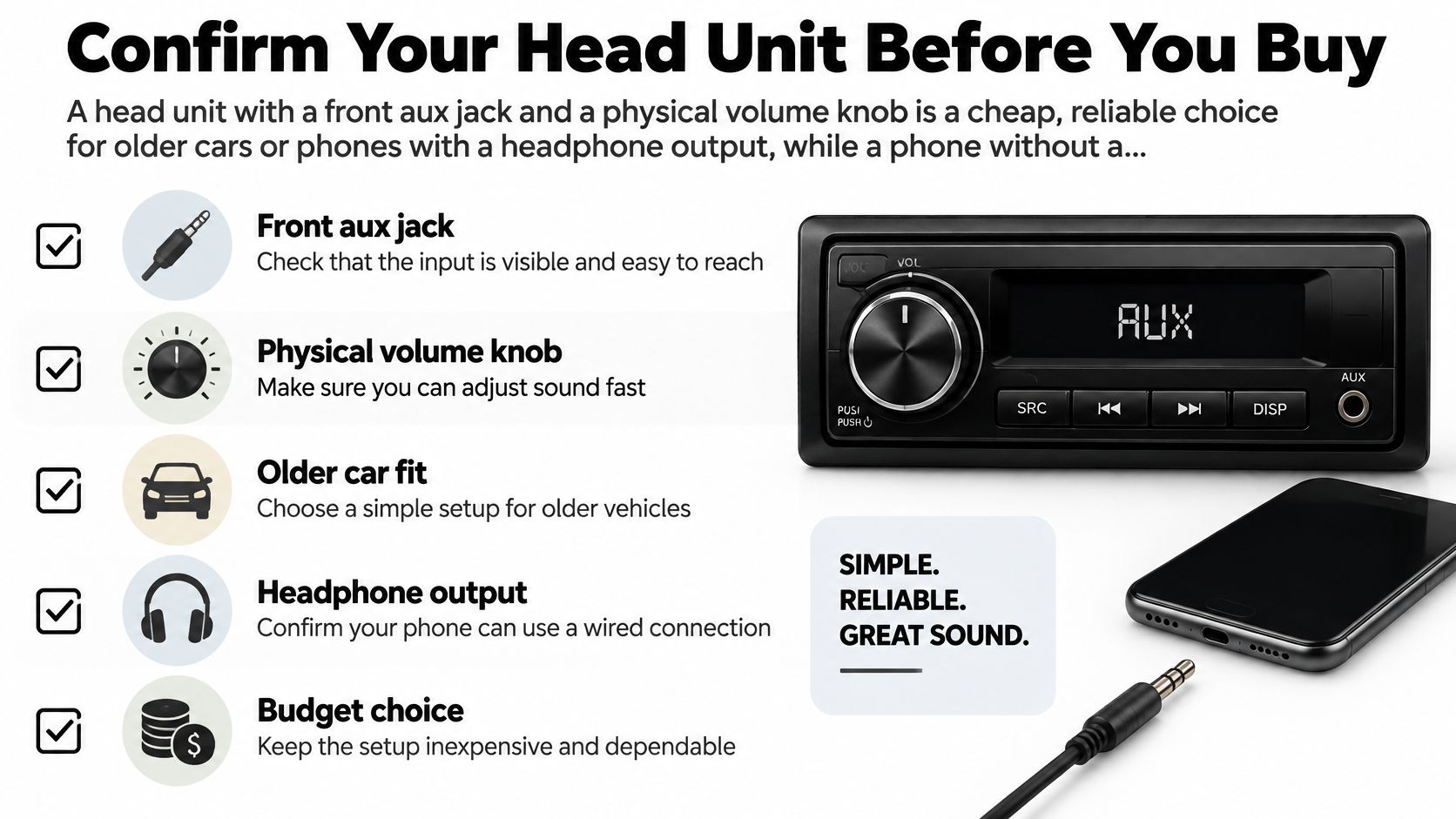
A head unit with a front aux jack and a physical volume knob is a cheap, reliable choice for older cars or phones with a headphone output, while a phone without a headphone output needs a DAC adapter, a USB capable head unit, or Bluetooth instead.
Work through the checklist in the graphic first, then confirm the details for your exact dash and phone.
Seven Checks Before You Pay
- Aux jack location: A front panel jack is easier to reach and test than a rear input that needs a cable routed through the dash.
- Physical volume and separate aux mode: You want a knob you can find by feel and a clear source button that selects aux without menu diving.
- Bluetooth fallback for calls: If you want hands free calling, aux alone won't provide it. Look for Bluetooth hands free in the same unit.
- Chassis size: Confirm single DIN or double DIN fit for your dash opening, plus any trim kit your car needs.
- Preamp outputs: If you plan to add amplifiers or a subwoofer later, check preamp output voltage and the number of output pairs now.
- Steering wheel control compatibility: Most cars need a separate interface module to keep factory buttons working with an aftermarket stereo.
- Factory harness compatibility: Match the wiring harness to your model so you don't cut factory wires or lose features you expected to keep.
If you're still learning the terminology, this explainer on what a head unit is and what it controls will help you read spec sheets without guessing.
Two buyers can run the same checklist and land on different units. A 2010 sedan owner who needs music and occasional calls can stop at a simple unit with front aux, Bluetooth hands free, and a volume knob, and skip the cost of a large touchscreen. A daily commuter who wants navigation prompts, voice control, and steering wheel track buttons needs a different budget: CarPlay or Android Auto plus the correct interface, because aux can't do those jobs no matter how good the cable is.
The checklist logic works outside cars too. The AQ-WR-5F Marine Audio Receiver – Waterproof Bluetooth Boat Stereo is listed at $999.99 and in stock, and its product page is a useful exercise in reading inputs, mount style, and controls as one matched set before you pay. The point isn't to put a marine unit in a sedan. It's to practice reading a listing the way you just read the seven checks.
We sell car audio and video products including speakers, subwoofers, amplifiers, head units and car radios, multimedia receivers, overhead and in-dash TVs, CarPlay radios, and SiriusXM satellite radio, and our shop handles all vehicle types, from compact sedans and trucks to SUVs and luxury cars. That range matters because fit problems usually come from the vehicle, not the jack.
If Your Car Has No Aux at All
You have three common retrofit paths. An aux add kit connects to a factory radio through a vehicle specific port or harness and keeps the dash looking stock. A Bluetooth to aux receiver only helps if you already have an aux input, since it plugs into that jack and adds wireless playback. An FM transmitter is the simplest to install, but it trades sound quality and station stability for convenience.
Confirm the input type, dash fit, and steering wheel compatibility before you order. Ask us to check fit for your exact model year and trim this week, before a low price unit turns into a return.
How to Connect an Aux Input Without Noise
Order matters. If you pick the wrong adapter first or route a cable beside power wiring, you'll chase noise that better planning would have prevented.
The steps in the process graphic match the routine below, so you can keep it open while you work.
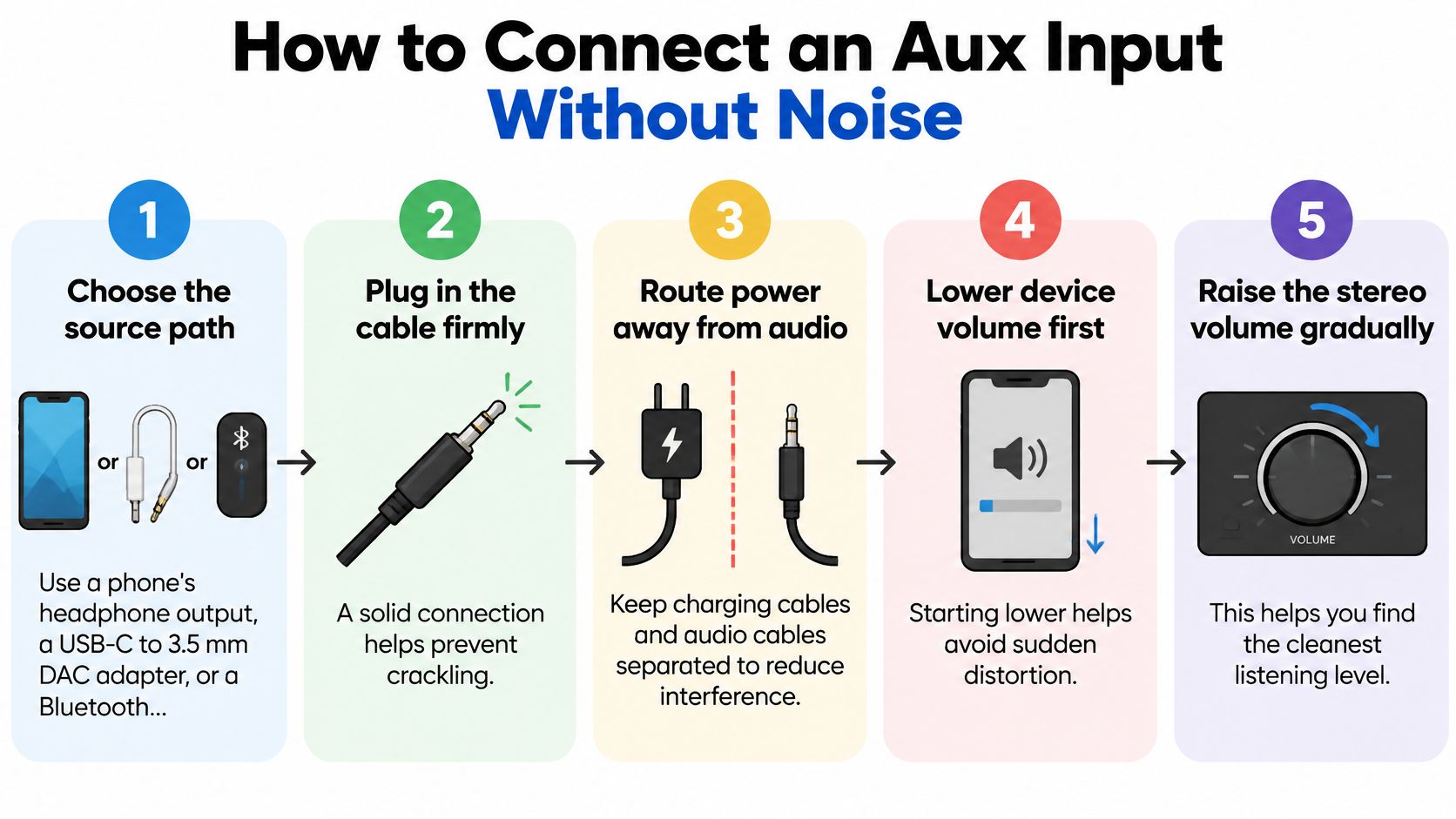
The Connection Routine in Order
- Choose the source path: Use a phone's headphone output if it has one. A phone with only a USB-C or Lightning port needs an adapter that outputs analog audio, since a plain metal pass-through plug can't do that conversion. If you'd rather skip adapters entirely, a Bluetooth receiver with an aux output plugs into the same jack.
- Pick the right cable: Use a short, shielded stereo TRS to TRS cable. Avoid a TRRS headset extension for this job, because the extra microphone contact can misalign in the stereo socket. A short cable also leaves less slack to manage and less length to pick up interference.
- Plan the route before you plug in: Keep the signal cable away from power and speaker wires where you can. A power wire radiates a small magnetic field, and a signal cable running parallel beside it absorbs that field along the entire run. If the cables must cross, cross once at a right angle so the exposure shrinks to a single point. Keep loops small and don't coil extra cable behind the radio.
- Prepare a clean ground for a new head unit: Find bare metal close to the head unit, remove paint at the contact point, use a star washer, and tighten the screw firmly. Paint acts as an insulator between the terminal and the chassis, and the star washer's teeth bite into bare metal for a solid connection. A loose or painted ground invites hum that no cable upgrade will fix.
- Mount and secure everything: Seat the head unit fully, route the aux cable behind the dash, and secure it with clips or fabric tape so it can't rub on sharp metal or get pinched by trim. Leave enough slack to plug in without pulling sideways on the jack.
- Power up and test at moderate volume: Select the aux input, start a familiar track with quiet and loud parts, and listen with the engine off and then running. Noise that appears only with the engine running needs attention before you close the dash. Check left and right balance to confirm both channels work.
Install check: Test before you push every trim panel back into place. It's much easier to reroute one cable now than after the dash is closed.
Once the test passes, set your levels. Raise the phone's volume until the sound is loud but still clean, then use the head unit's volume knob for daily listening. A stronger signal from the phone means the stereo's input stage amplifies less, and less amplification means less background hiss. Source first, stereo second is a habit that keeps most noise problems from starting at all.
Fixing Hum, Hiss and Low Volume
A whine that climbs in pitch with the revs has a different cause than a phone that sounds quiet even at high volume. Sort the problem into one of three groups first: noise, low level, or no sound. That sorting tells you whether to reach for a volume control, a different cable, or the grounding hardware.
| Symptom | Likely cause | First check | If the problem stays |
|---|---|---|---|
| Hum or whine that rises with engine speed | Ground loop or alternator noise | Disconnect the aux cable with the engine running; silence means the fault enters through the signal path | Clean and tighten the grounds, reroute the cable away from power wiring, and unplug the phone from its charger, since charging creates a second ground path |
| Hiss in quiet passages | Low source output or a poor adapter | Raise the phone volume | Try a shielded cable, or a DAC-equipped adapter on a USB-C-only phone |
| Low volume at normal head unit settings | Weak source level or a passive adapter | Raise source volume before touching the head unit | Compare against a direct TRS cable; a passive adapter only changes the connector shape |
| Distorted or crackling sound | Source volume too high | Lower the phone volume a step | Reduce the head unit level and recheck on a loud passage |
| No sound in aux mode | Wrong input, TRRS headset plug, or a phone with no analog output | Confirm the input selection, then use a TRS cable | On a USB-C-only phone, switch to an adapter with a built-in DAC |
| Sound from one side only | Damaged tip or ring contact | Inspect or replace the cable or plug | Test a second cable; if both fail, the jack contact itself is worn |
Two details hide inside that table. The head unit's input stage has its own gain limits, so a weak source can stay quiet even with the volume dial turned up. And a USB-C-only phone sends digital audio, so its adapter needs a built-in DAC to create the analog signal an aux input accepts. That single conversion explains most adapter complaints: low output, hiss, channel dropouts, or a phone that never recognizes the connection.
Work through the rows one change at a time and note which step changed the sound. That single record is what separates a bad adapter from a wiring fault.
Why Ground Loops Sound Like Engine Whine
Aux inputs are vulnerable because they use an unbalanced connection with a shared signal reference. A ground potential difference between the portable source, head unit, and amplifier can push unwanted current through the audio shield, heard as hum, buzz, or alternator whine whose pitch tracks engine speed, as Audio Intensity's car audio ground loop guide explains. The difference only needs to be tiny, because line level audio signals are measured in millivolts.
The disconnect test in the first table row is your decision point. If the noise disappears with the cable pulled, the fault lives in the signal path or the grounds. If the noise stays with the cable removed, inspect the head unit, the amplifier, and their ground points instead.
When that test points at the signal path and grounding and routing are already clean, read how a 3.5 mm ground loop isolator works and when to use one before fitting it inline. A poorly matched isolator can soften frequency response or add distortion, so treat it as the last step in the sequence.
If the aux setup still hums, sounds weak, or does not match the phone you use every day, we can confirm the right head unit, adapter, harness, and steering wheel interface for your vehicle before you buy. Visit Audio Jam Inc to shop head units and CarPlay options, or ask our Delaware team to check fit and plan a clean install.